Free Kuaishou & Kwai Video Downloader Online — without watermark, HD & 4K
Download Kuaishou and Kwai videos without watermark on iPhone, Android, and PC. No login required. Free, fast, and unlimited.
Our Kuaishou video downloader online is a free tool to download any Kuaishou or Kwai video in seconds — 4K Ultra HD, no watermark, no login required. It works instantly on all devices, including Android, iPhone, and PC. Our tool provides a simple and reliable way to save your favorite Kuaishou videos in high quality. Whether you use the Chinese Kuaishou app or the international Kwai version, you can download unlimited videos without installing any software.
- 1Copy
Open Kuaishou or Kwai app → tap Share → tap Copy Link
- 2Paste
Paste the link in the box above → click Get Download Link
- 3Download
Choose your quality (HD / 4K) → file saved instantly to your device
How to Download Kuaishou & kwai Videos (Three simple steps)
To download your videos for free without a watermark, follow these three steps.
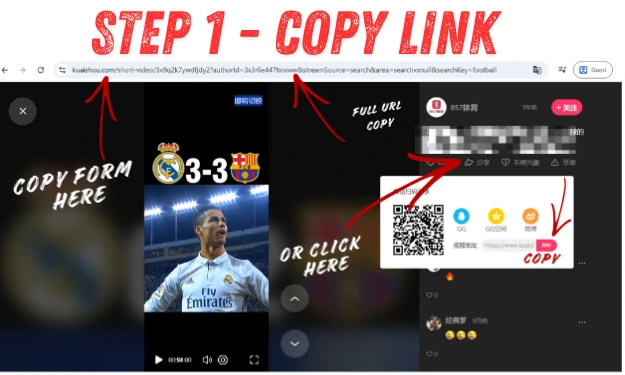
Step 1 – Copy the Kuaishou Video Link
You need to open the Kuaishou (Kwai) app or website, find the video that you want to download, and then click on the share button or icon. Then, copy the video’s link.
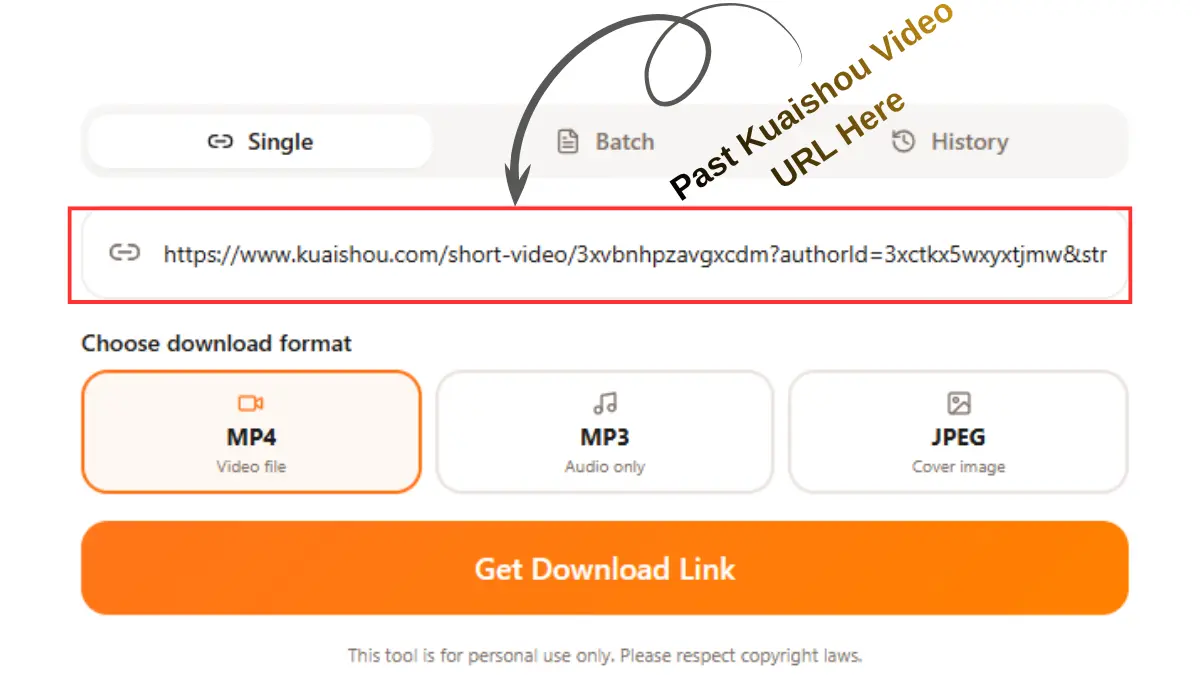
Step 2 – Paste the Link into the Downloader
Then come back to our website and paste the link that you copied from the Kuaishou (Kwai) app or website, and then click the “get download” button. This tool automatically detects your video.
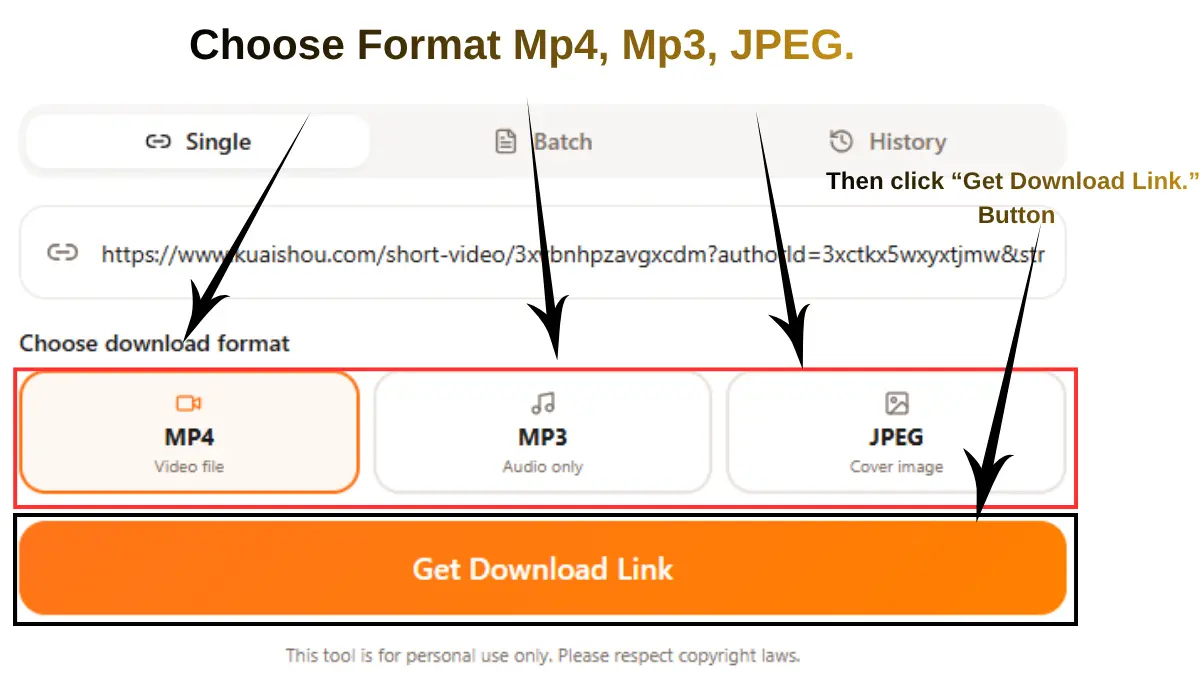
Step 3 – Choose Quality & Download
Then, in 5 to 10 seconds, you will see your video in preview, and then you can select the quality (480p, 720p, 1080p, or 4K) you want for your video. Click the download button to save your video on a PC, iPhone, or Android device.
⚡ Save Time: Need to save multiple Kuaishou videos at once? This tool also supports bulk downloading. If you have a list of videos to save, read our complete Kuaishou Bulk Download Guide — it shows you how to batch save multiple Kwai videos quickly without repeating steps.
Common Problems after you put the link & How to Fix Them
Below is a common problem that you may face. But if you follow the above step carefully, in most cases, users don’t experience issues.
One Common Solution For Most Errors On My Website:
Keep in mind when you are downloading the videos, make sure the internet connection is stable, and then any errors will be shown on my website. Follow the two processes below.
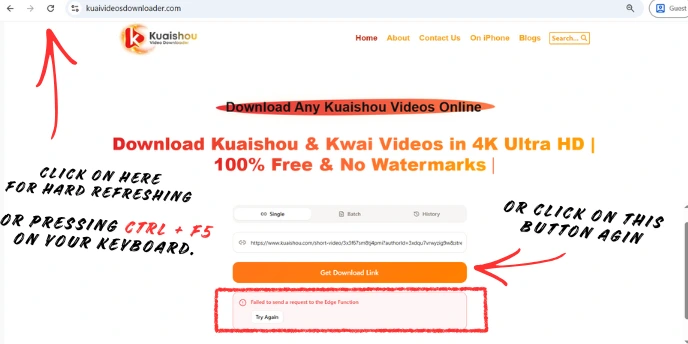
First solution:
Do a hard refresh of our website by pressing Ctrl + F5 on your keyboard. Then paste the video link again and click the “Get Download Link” button. In most cases, this resolves the issue immediately.
Second Solution:
If the error still appears, simply click the “Get Download Link” button again at the same time and wait a few seconds. Maybe you face this issue due to temporary loading, browser cache, or network issues; it’s usually solved by retrying.
Still Problem? Read the Full Troubleshooting Guide
If you want an all-Kuaishou Video Saver troubleshooting guide covering issues such as:
- Link Parsing Failed / Invalid Link
- Video Still Has Watermark
- Download Button Not Appearing
- Unsupported or Private Videos
- Slow or Stuck Downloads
- Mobile (Android / iOS) Download Issues
- And many more common problems
All Kuaishou Link Formats Supported
Our tool extracts and parses all types of Kuaishou & Kwai links – from mobile app shares to direct video URLs
Shortened URLs shared through Kuaishou’s sharing features.
URLs from international users of the Kwai platform.
https://www.kwai.com/video/xxxx
Links copied directly from the Kwai mobile app on your phone.
https://v.kuaishou.com/KvSbXmcp
Kuaishou short links, also known as Kwai links, typically use shortened domains followed by an alphanumeric ID.
Direct links to specific videos on the Kuaishou platform.
Links to profiles and photo posts on Kuaishou/Kwai.
• Profile-shared links
• Photo posts links
• User profile URLs
What Is a Kuaishou (Kwai) Video Downloader?
A Kuaishou (Kwai) video downloader is a free online tool that lets you download Kwai videos directly to your device without watermarks, without login, and without quality loss.
Key Benefits
- Download Kwai videos without a watermark
- Save videos directly to your local device or gallery
- Supports video, audio (MP3), and images in PNG format
- Works on any device: mobile, tablet, and desktop
Kuaishou (Kwai) App vs. Our Downloader: Which one do you want to choose?
| Feature | Kwai App |
Best Choice
Our Downloader |
|---|---|---|
| Watermark | Yes | No Watermark |
| Offline Access | App only | Device storage |
| Login Required | Yes | No Login |
| Formats | Video Only |
Video
MP3
PNG |
Want to learn more?
Read our complete guide, where we discuss:
- What is Kuaishou (Kwai)?
- How Video Downloaders Work.
- Kwai App vs Video Downloader
- What is the difference between Kuaishou and Kwai
- Kwai vs. TikTok
- Kwai Downloader Online vs. Modded APKs
- Pros and cons
- Is Kwai Safe? Privacy, security, etc.
Want Kwai’s detailed instructions, troubleshooting tips, and download methods? Read our complete Kwai video downloading guide.
Why use our Kuaishou downloader? Key Features!
Let’s be honest—when there are so many Kuaishou video saver applications available. So why do people use ours? Below, I have explained what makes us stand out from the others, and that’s why people come back again and again.
Download in any quality
Choose the video size that suits you. Watch on a small phone? Pick a smaller file. Got a big screen? Go for 4K. You’re always in control.
No logo or watermark
You will download the video using our tool, so it will not have the Kuaishou or Kwai logo—just the video, nothing added on top.
Save audio as MP3
Just want the song or sound from a video? You can download only the audio. Great for saving background music or spoken content.
Paste any type of link
Copy the link from the Kuaishou app, a browser, or a shared message — it all works. No need to change or fix the link before pasting.
Batch download — save many videos at once
No need to download videos one by one. You save all links in Notepad, then select the batch downloader option, and paste your all links line by line, then click the “Process all URLs” button; all videos save at the same time on your local device.
Your privacy is safe
We don’t save or store what you download. Although we have also provided a history option in our downloader so that you can see which videos you have downloaded, this data is not shown in our database, and we cannot access it or view it. Your IP address and activity are never recorded.
Saves to your gallery
Downloaded videos go straight into your phone’s camera roll or photo gallery. No weird file formats, no extra steps to make it playable.
Always kept up to date
Kuaishou always kept up-to-date their functions and features from time to time, which can break downloaders. We update our tool quickly so it keeps working without you having to do anything.
See your download history
Forgot what you already downloaded? Check the history section to see past download videos. It’s stored only on your device — no account needed.
100% free, no limits
You can download as many videos as you want. No daily limit, no sign-up, no paid plan. Open the tool page, paste the link, and download the video.
Is It Legal to Download Kuaishou or Kwai Videos?
Both Kuaishou and Kwai are the most popular short video apps or platforms in the world. Millions of people watch, upload, create, and share videos on them every day. Many user want to download their favorite videos on their phones to watch later, without internet, or save their own videos as a memory. Most people think the important question is, “Is it legal to download Kuaishou or Kwai videos?” Let’s break it down into simple words.
The Short Answer
It depends on what you do after downloading videos.
Rule 1: Your Own Videos — No Problem
If your video is deleted from your local storage and you have the same video on your Kaushou profile, then you can save it again and use it however you want. It’s your content, so there are no restrictions.
Rule 2: Someone Else’s Video — Personal Use Only
If you want to download another creator’s videos, here’s the same golden rule.
Watch it. Don’t repost it. Don’t sell it. Don’t claim it as yours.
For personal use like watching later, without internet, offline, on your own phone, that’s usually allowed by platforms and creators and usually not taken action against.
But the issue is created when you download the creator’s video and post it on YouTube, Instagram, WhatsApp status for promotion, or any other platform—especially without giving credit; that’s a copyright violation. If you downloaded the video, the video still belongs to the person who made it.
Rule 3: Never Use Downloaded Videos for Business
This is the biggest mistake people make. Using someone else’s video in:
- A paid advertisement
- A YouTube channel for views/income
- A business page or product promotion
without permission is a direct violation of copyright law, even if you mention the original creator’s name.
What should you do instead? Message the creator directly and ask permission. Most creators are happy to allow it if you credit them properly. Always get permission in writing (even a simple screenshot of their “yes” is good enough).
What does Kuaishou/Kwai say about its own rules?
Kwai and Kuaishou’s app rules (Terms of Service) technically say users shouldn’t download content without permission. But this is a rule between you and the app — not like breaking the law. My experience is that social media platforms rarely take action against someone who downloads a video just for personal viewing.
Other than downloading, Kwai and Kuaishou also have their own in-app rules. These keep the platform safe for everyone:
Safe Content Only
No adult content, violence, hate speech, or dangerous stunts allowed.
No Fake News
The app works to stop fake news and wrong health information from spreading.
Music Rules
If creators use music in their videos, Kuaishou has a system to pay the original music owners fairly.
Honest Selling
During live shopping streams, sellers can’t lie about a product or oversell its benefits.
Earning Rules
Gifts, commissions, and creator payouts all follow set regional guidelines.
Age Limits
Kids under the minimum age can’t make in-app purchases or send gifts without supervision.
Does the Law Change by Country?
Yes, the law changes because every country makes its own rules based on its own government, culture, and legal traditions. A few reasons for this:
- Every Country Makes Its Own Laws: No outside country or body can force a nation to follow its rules.
- Culture and Religion Matter: Local traditions and beliefs shape what people think is right or wrong — this also affects how strictly copyright rules are followed.
- Different Legal Systems: Some countries (like the US and UK) mostly go by past court decisions. Others (like much of Europe) follow written law codes. Many South Asian and Middle Eastern countries use a mix of local and religious laws.
This is why you are treated differently when you download your personal videos in different places. Here we show you how it plays out in a few key countries:
Pakistan:
Under the Copyright Ordinance 1962. Downloading for personal use is generally allowed, but reposting or using the content commercially without permission is a serious violation.
India:
Under the Copyright Act 1957, downloading copyrighted video content without permission is technically illegal, even for personal use. In practice, though, enforcement mainly targets large-scale distribution and commercial misuse — not individual personal downloads.
United States:
Has some of the strictest copyright laws, which are supported by the DMCA. Downloading copyrighted content without permission is illegal regardless of intent. The exception is content you own or content licensed under Creative Commons—that’s fully legal.
The bottom line: personal, private downloading is rarely acted upon anywhere, but the legal exposure is real the moment content is reposted or used commercially—and it’s slightly higher in strict-enforcement countries like the US.
Quick Summary
| What You Do | Is It Okay? |
|---|---|
| Download your own video | ✅ Yes |
| Download someone else’s video to watch privately | ✅ Yes |
| Repost someone else’s video without permission | ❌ No |
| Use someone else’s video for ads or business | ❌ No |
| Ask permission and get a “yes” before reposting | ✅ Yes |
Your Privacy & Security
We take your privacy seriously:
- ✅ No video storage – Downloads go directly from Kuaishou to your device
- ✅ No tracking—We don’t monitor your activity
- ✅ No login required—here you completely anonymous
- ✅ HTTPS protection – Secure connection
- ✅ No data collection—We don’t collect emails, IPs, or personal info
The optional “History” feature stores data locally on your device only (never on our servers).
For Global User Kwai Video Downloader
Search in your language – Our tool understands them all
(Detailed instructions, troubleshooting, and tips for users worldwide)
Frequently Asked Questions (FAQ) about our Downloader
Conclusion—Download Kuaishou Videos online Easily & Safely
You don’t need to install or use the risky software that can harm your data, so you just need our professional Kuaishou video downloader that offers you ultra-high-quality video downloads in 4k without logos for free.
Our tool is thelatest version of the Kuaishou (also known as Kwai) video downloader. With continuous updates and maintenance, our tool delivers reliable performance on any device. Our app always ensures the security of our customers who trust us.
Got questions? Check our detailed FAQ section or contact us—we’re always here to help with any issues you face.

