
Download Kuaishou & Kwai Videos in 4K |
Download Kuaishou (Kwai) videos in 4K Ultra HD without watermark—fast, free, and no login required. Works instantly on all devices including Android, iPhone, and PC. Our tool provides a simple and reliable way to save your favorite Kuaishou videos in high quality. Whether you use the Chinese Kuaishou app or the international Kwai version, you can download unlimited videos without installing any software.
- 1Copy
Open Kuaishou or Kwai app → tap Share → tap Copy Link
- 2Paste
Paste the link in the box above → click Get Download Link
- 3Download
Choose your quality (HD / 4K) → file saved instantly to your device
How to Download Kuaishou & kwai Videos (Three simple steps)
To download your videos for free without a watermark, follow these three steps.
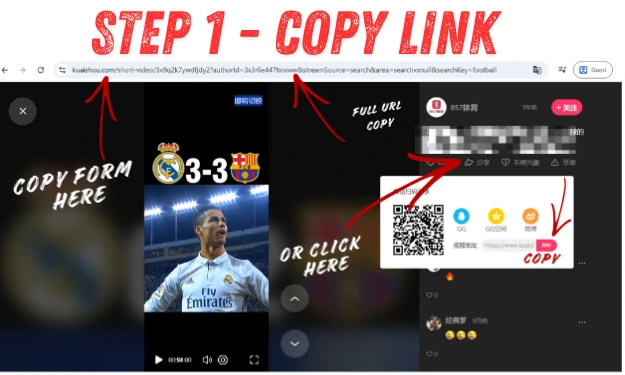
Step 1 – Copy the Kuaishou Video Link
You need to open the Kuaishou (Kwai) app or website, find the video that you want to download, and then click on the share button or icon. Then, copy the video's link.
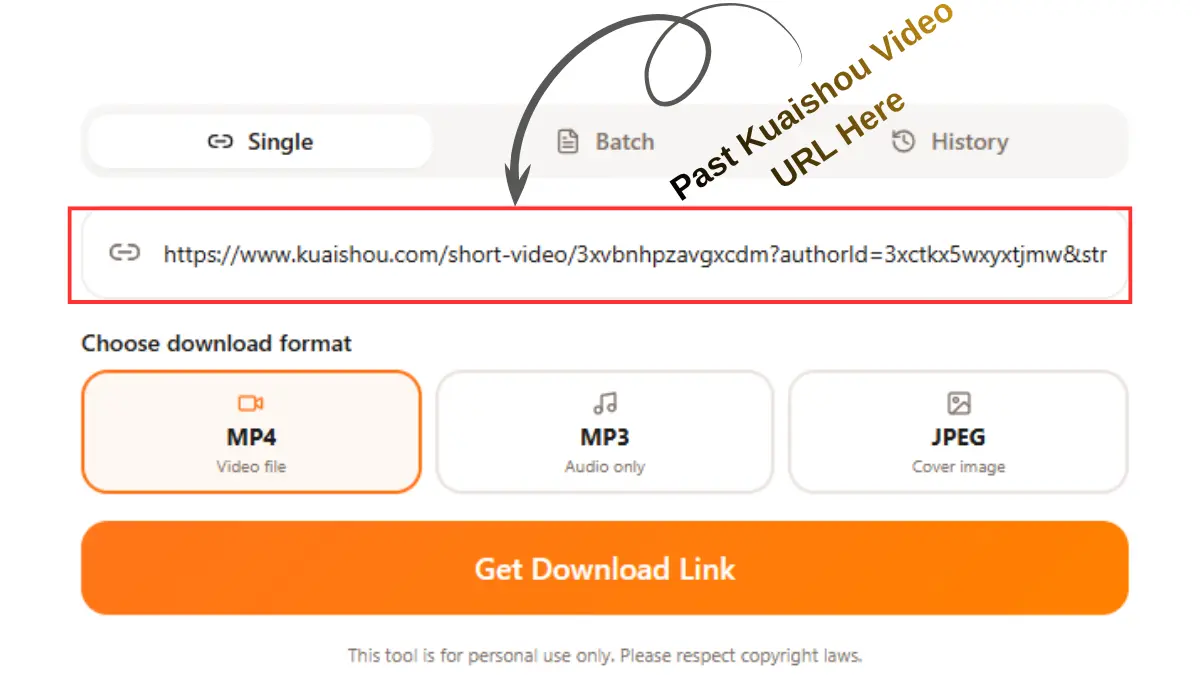
Step 2 – Paste the Link into the Downloader
Then come back to our website and paste the link that you copied from the Kuaishou (Kwai) app or website, and then click the "get download" button. This tool automatically detects your video.
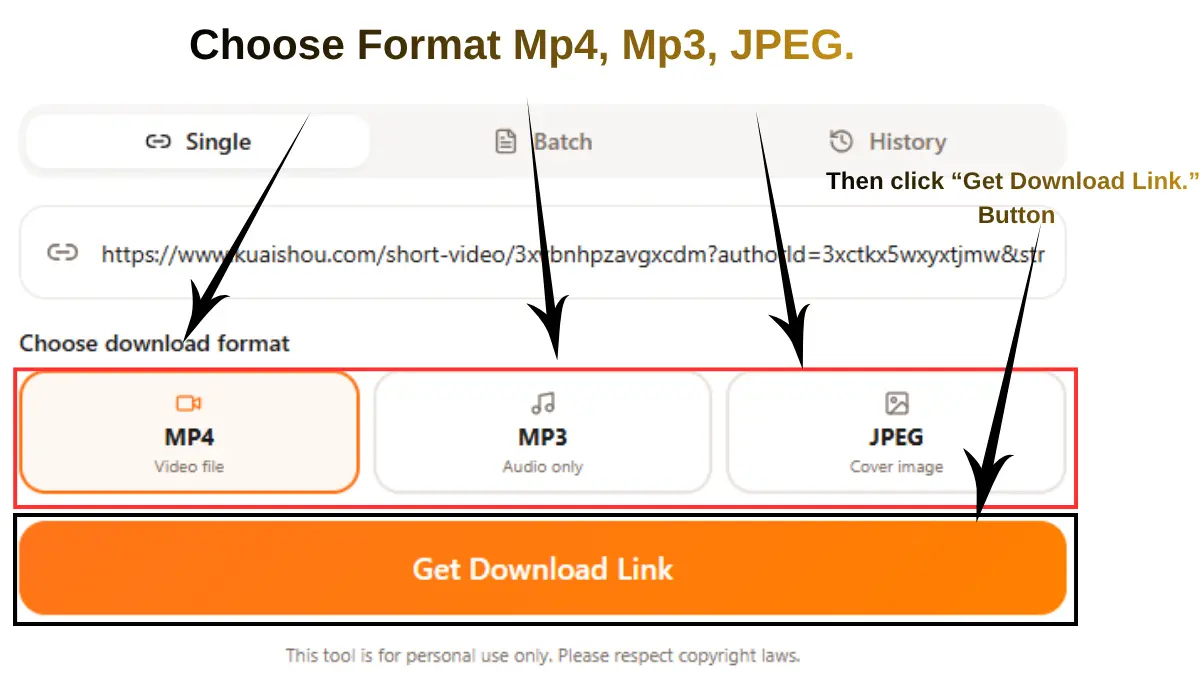
Step 3 – Choose Quality & Download
Then, in 5 to 10 seconds, you will see your video in preview, and then you can select the quality (480p, 720p, 1080p, or 4K) you want for your video. Click the download button to save your video on a PC, iPhone, or Android device.
⚡ Save Time: Need to save multiple Kuaishou videos at once? This tool also supports bulk downloading. If you have a list of videos to save, read our complete Kuaishou Bulk Download Guide — it shows you how to batch save multiple Kwai videos quickly without repeating steps.
Common Problems after you put the link & How to Fix Them
Below is a common problem that you may face. But if you follow the above step carefully, in most cases, users don’t experience issues.
One Common Solution For Most Errors On My Website:
Keep in mind that when you are downloading the videos, make sure the internet connection is stable, and then any errors will be shown on my website. Follow the two processes below.
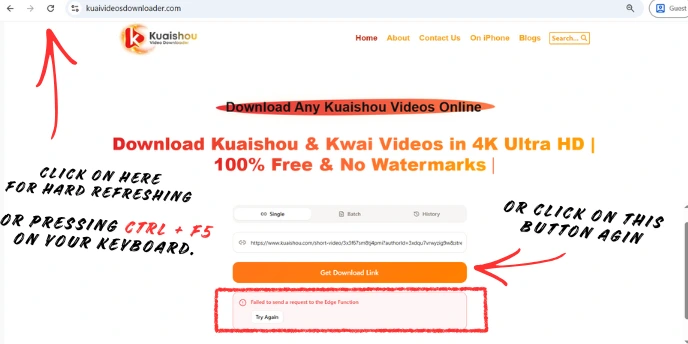
First solution:
Do a hard refresh of our website by pressing Ctrl + F5 on your keyboard. Then paste the video link again and click the “Get Download Link” button. In most cases, this resolves the issue immediately.
Second Solution:
If the error still appears, simply click the “Get Download Link” button again at the same time and wait a few seconds. Maybe you face this issue due to temporary loading, browser cache, or network issues; it's usually solved by retrying.
Still Problem? Read the Full Troubleshooting Guide
If you want an all-Kuaishou Video Saver troubleshooting guide covering issues such as:
- Link Parsing Failed / Invalid Link
- Video Still Has Watermark
- Download Button Not Appearing
- Unsupported or Private Videos
- Slow or Stuck Downloads
- Mobile (Android / iOS) Download Issues
- And many more common problems
All Kuaishou Link Formats Supported
Our tool extracts and parses all types of Kuaishou & Kwai links - from mobile app shares to direct video URLs
Shortened URLs shared through Kuaishou's sharing features.
URLs from international users of the Kwai platform.
https://www.kwai.com/video/xxxx
Links copied directly from the Kwai mobile app on your phone.
https://v.kuaishou.com/KvSbXmcp
Kuaishou short links, also known as Kwai links, typically use shortened domains followed by an alphanumeric ID.
Direct links to specific videos on the Kuaishou platform.
Links to profiles and photo posts on Kuaishou/Kwai.
• Profile-shared links
• Photo posts links
• User profile URLs