All Kuaishou Video Downloader Problems & Solutions (Complete Guide)
If you are facing any issues downloading videos from our Kuaishou video downloader, you’re not alone. Every month, thousands of users run into errors like Link Parsing Failed, Stuck at 99%, or No Download Button. Don’t worry — most of these problems are caused by network issues, temporary server problems, or outdated browser cache, and they can be fixed in under 60 seconds. This complete guide covers every known Kuaishou downloader error in 2026 and exactly how to fix each one.
But some problems cannot be solved just by refreshing the page. If you’re unsure which method works best, explore our All Kuaishou Download Methods (Complete Comparison Guide) to choose the most reliable option. Here are these common issues and how to fix them.
How to Download a Kuaishou Video (Step-by-Step)
Before troubleshooting errors, make sure you’re following the correct download steps:
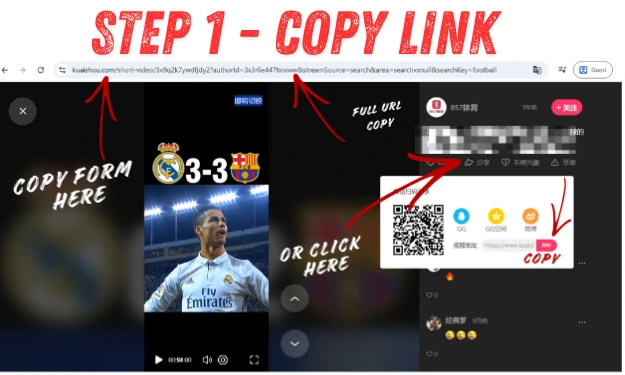
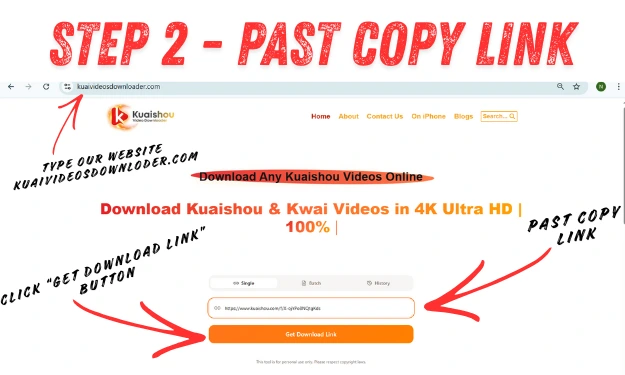
- Open the Kuaishou app on your phone or visit kwai.com on your browser.
- Find the video that you want to download on your phone or computer.
- Tap the Share button (arrow icon) → Select “Copy Link.”
- Open our downloader at kwaivideosdownloader.com.
- Paste the link into the search box.
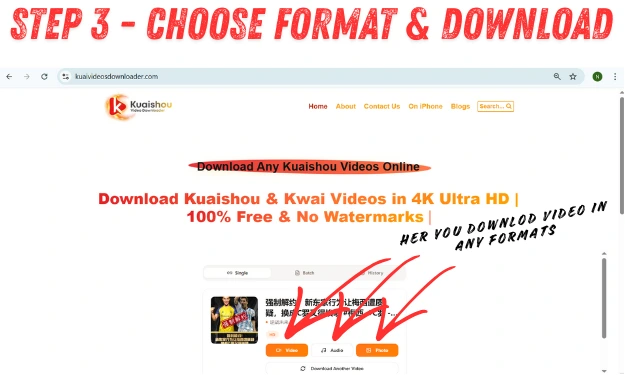
- Choose your format — with watermark, without watermark, MP3 audio, or PNG.
- Click the “Get Download Link“ button and wait 5–10 seconds.
- Tap Download and the video saves to your device.
⚠️ Important: Always copy the link using the official Share button inside the Kuaishou app. Links copied from your browser address bar often expire and cause parsing errors.
Common Kuaishou Download Errors and How to Fix Them
1. Link Parsing Failed—What to Do
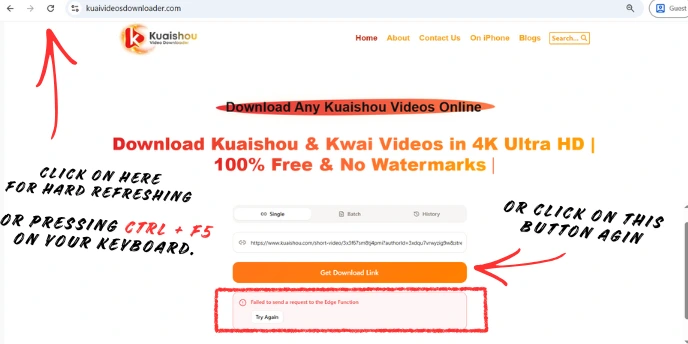
It’s the most common problem that occurs because the downloader cannot read the video data from the URL you provide.
Why does link parsing fail?
When you click the “Get Download” button, and it displays an error like “Link Parsing Failed” or “Link Could Not Fetch,” don’t panic—it’s normal and usually happens for these reasons:
- You may have copied an incorrect or incomplete URL
- Double-check that you copied the full video link from the official Kuaishou app or website (sometimes you copy the URL too fast, and then the beginning or end part gets cut off).
- If you copied a link from a third-party app, open the video in a new tab and copy the original URL instead
- Come back to our website and do a hard refresh (press Ctrl + F5 on your keyboard)
- Network issues or temporary server problems may cause parsing or fetching errors.
- The link has expired—Kuaishou short links expire after a few minutes. Always copy a fresh link right before pasting.
2. Video Still Has a Watermark After Downloading
When you download a video, but the Kuaishou logo remains on the video, it’s because sometimes the downloader is unable to fetch the original version.
Why is the Kuaishou watermark still present on the videos?
- You may have selected the wrong download option
- Check if the tool provides a “without watermark” or “original video”
- option and select it
- The video creator may have added their own watermark to the original video
- Some very old videos have the watermark permanently embedded into the video itself, which can’t be removed by any downloader
- Try selecting a different resolution option
- Once again, re-parse the video link—it may solve the issue
If you plan to share videos again on social platforms, read our Kuaishou Repost Guide (Share Videos Correctly) to avoid quality loss or watermark issues.
3. Slow Download Speeds or Stuck at 99%
Sometimes, when you are downloading your video, it gets stuck on 99%, or it takes a long time to download.
Why is my Kuaishou download stuck at 99% or taking too long?
- If you are using a VPN on your phone while downloading a video, it might take a long time because many servers slow down your speed.
- Before downloading a video in 4k, you might first check your phone or PC storage because HD-quality videos can cover a huge space.
- You should use modern browser tools like Chrome or Safari because our tool works best on these browsers, which help you to download videos fast in 4k.
- You must also clear your cache, which removes old and glitchy data and makes downloading even more reliable.
- You should double-check that you are using the latest 2025 version of our downloader.
4. Download Button Not Appearing
Sometimes when you paste the link in the downloader, there is no download button, or nothing happens.
Why does the download button not appear?
- Browser issues, such as cached data, may be the cause
- Ad blockers or script restrictions might be blocking the button
- Try refreshing the page
- Disable any active ad-blocking extensions
- Switch to another browser like Chrome, Firefox, or Safari
- Ensure and check your internet connection is stable
- Slow loading may stop the button from appearing properly
Best Browsers for Kuaishou Video Downloading (2026)
| Browser | Speed | Watermark Removal | Mobile Support | Recommended? |
|---|---|---|---|---|
| Google Chrome | ⚡ Fast | ✅ Yes | ✅ Yes | ✅ Best |
| Safari (iOS) | ⚡ Fast | ✅ Yes | ✅ Yes | ✅ Great |
| Firefox | 🟡 Medium | ✅ Yes | ✅ Yes | ✅ Good |
| Edge | 🟡 Medium | ✅ Yes | ✅ Yes | 🟡 OK |
| Opera Mini | 🔴 Slow | ❌ Sometimes | 🟡 Partial | ❌ Avoid |
| UC Browser | 🔴 Slow | ❌ Sometimes | 🟡 Partial | ❌ Avoid |
Tip: Always use the latest version of Chrome or Safari for the fastest, most reliable downloads.
5. Unsupported or Private Videos
When you paste the link in the downloader, the video cannot be downloaded because it is a “private video” that cannot be downloaded.
Why does it say “This video cannot be downloaded” or “Private video”?
- Kuaishou videos from private accounts cannot be downloaded due to privacy protections
- Restricted posts are not accessible through downloaders
- Videos that require login or special permissions to view cannot be downloaded
- Very new content may not be supported temporarily
- Region-restricted videos may not be accessible
- Make sure the video is publicly accessible before attempting to download
| Issues | Quick Fix |
|---|---|
| Parsing Failed | Re-copy the link and press Ctrl+F5. And try again. |
| Private Video | Only public videos can be downloaded. |
| Stuck at 99% | Disable VPN and check your storage space. |
| Slow Speeds | Switch to Google Chrome or Safari. |
Technical Issues with Specific Video Types
While using Kuaishou video downloader, you may find out that some videos save perfectly, but some fail every time. This is not a problem with the tool; it is the technical restrictions of a specific video that are set by Kuaishou.
A few technical issues with specific videos are as follows:
1. Live Streams
The Problem: You can not download a live stream when it is currently “live.”
The “Why”: live streams use a technology which is called HLS (HTTP Live Streaming), which breaks the video into 2-second slices, and it becomes difficult to download for the downloaded because the standard tool always looks for an MP4 file.
The Solution: You should wait for the creator to end the live stream and then post it as a highlight on his profile, then you can download it.
2. High-Bitrate and 4K Content
The Problem: The download starts, but halfway through it fails, or the video has no sound.
The “Why”: Kuaishou high-quality videos, like 4k, use advanced codes (H.265/HEVC), which are heavy, and some old browsers or mobile phones can not fetch them because they require more RAM and more memory to download them.
The Solution: You should use an advanced browser and a good mobile phone that has more RAM and storage so that you can save your high-quality 4k videos.
3. Deleted or Under-Review Videos
The Problem: The video plays but cannot be downloaded.
The “Why”: If the video is private or the video has violated the community guidelines, then the platform disables the external ports, so you can watch that video, but you cannot download it because the tool cannot fetch that data because the external data is disabled by platfoam.
The Solution: You should always choose a video that follows the platform’s rules.
4. Author-Protected “No-Share” Videos
The Problem: There’s no copy link button, or the link provided is short and expires.
The “Why”: some creators disable the sharing, then Kuaishou makes a temporary URL for that video, which is like a password, and you can use it one time if you do not paste it directly in the downloader; it get expires, and the downloader tool gets a “403 Forbidden” error.
The Solution: First, open the tool on your phone, then copy the link directly and paste it into the downloader to download it.
5. Region-Locked or “Grey Zone” Content
The Problem: The link works in the Kuishou app, but the downloader displays a ‘File Not Found’ statement.
The “Why”: it is because some content is restricted by Kuaishou, which is just available to watch in China, and our tool is global, so if there is any video with a digital border, our tool cannot access it. You can just watch it on your phone. If you’re accessing Kuaishou from outside China, check our Guide for International Users (Access & Download Tips) for better compatibility.
Quick Troubleshooting Checklist
If you are still facing issues, run through this 10-second checklist:
| Problem | Quick Action |
|---|---|
| Invalid Link | Re-copy the link from the “Share” button. |
| Button Unresponsive | Turn off your Ad-Blocker temporarily. |
| Audio Only (No Video) Check if you accidentally selected “Download MP3,” or use our MP3 Converter (Extract Audio from Kuaishou Videos) tool properly. | Check if you accidentally selected “Download MP3.” |
| Video Not Saving | Check your “Downloads” folder or browser permissions. |
By following these simple troubleshooting steps, you can solve almost any issue you face while using our online Kuaishou video downloader. Most of those errors are just temporary glitches caused by platform updates. If you’ve double-checked your link and refreshed the page but still can’t save your video, feel free to try again after a few minutes. Our system is already updating to match the latest Kuaishou changes!
Still Need Help?
If none of these solutions worked, please contact our support team. Provide the Kuaishou link you are trying to use, and our developers will update it within 24 hours.