How to Download Bulk Kuaishou Videos – Step-by-Step Guide for Fast Batch Saving
If you have one video, then okay; you can use any tool because all tools give single Kuaishou video download options. What happens when you have multiple videos and you want to download all of them? So don’t worry; I built a free Bulk Kuaishou videos downloader tool because if you use another tool and you download videos one by one, then maybe your valuable time is wasted.
If you only need to save one video right now, our 4 Proven Ways to Download Kuaishou Videos Without Watermark guide is a faster read. But if you regularly need to save multiple videos in one go, stay here — this is the guide for that.
Ready to skip the reading? Use our free batch Kuaishou Video Downloader to save multiple Kwai videos in 4K without watermarks — right now, no signup needed.
Quick Comparison: Single Download vs Bulk Download
| Download Type | Single Download | Bulk / Batch Download |
|---|---|---|
| Download 20 videos at a time | 30–40 minutes | Under 2 minutes |
| Steps per video | 2–3 steps | 1 step after link collection |
| Best for | Casual use | Editors, researchers, archivists |
| File organization | Manual | Automatic queue |
What actually does the “Batch/Bulk Downloading” option mean in our online tool?
“Bulk” or “batch” downloading simply means processing more than one video in a single session. Instead of visiting each video, copying its URL, pasting it into a tool, and waiting — you collect all your links first, then run them through the tool together.
This matters more than people think. A creator or Kuaishou user who want to save 20 videos manually may spend 30-40 minutes on the process. A batch tool process all videos under two minutes.
The term kuaishou video downloader bulk refers to tools specifically built to handle multiple video URLs in one request — not just tools that download one video quickly.
Who Actually Uses Kuaishou Bulk Downloader?
Understanding who needs this and how you use it more smartly:
| User Type | Why They Batch Download |
|---|---|
| Video editors | Need raw footage from multiple creators for compilation projects |
| Social media managers | Archive campaign content or competitor videos for analysis |
| Students and researchers | Save reference clips for offline study or presentations |
| Content creators | Back up their own uploaded videos as a personal archive |
| Offline viewers | Download playlists or topic collections before traveling. |
If you fall into any of these groups, a Kuaishou bulk download will give you proper guidance—not just grabbing a random tool.
How to Bulk Download Kuaishou Videos: Full Step-by-Step
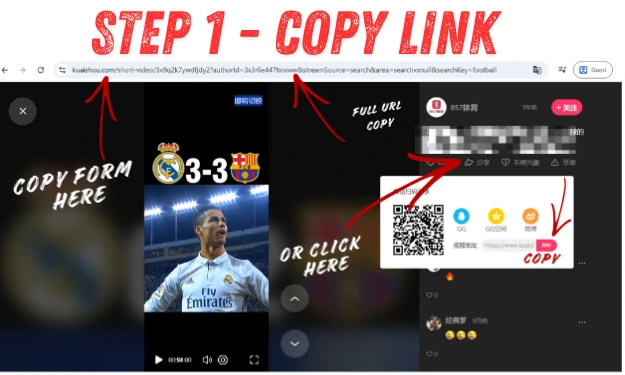
Step 1 — Collect your video links
Open Kuaishou (or Kwai) on your phone or browser. For each video you want to save:
- Tap the Share button on the video
- Select Copy link
- Paste each link into a plain text document or notes app
If you are saving videos from a specific creator’s profile, copy the profile URL as well — some batch tools can pull all public videos from a profile URL directly.
Tip: Keep your links in a numbered list so you can track which ones downloaded successfully.
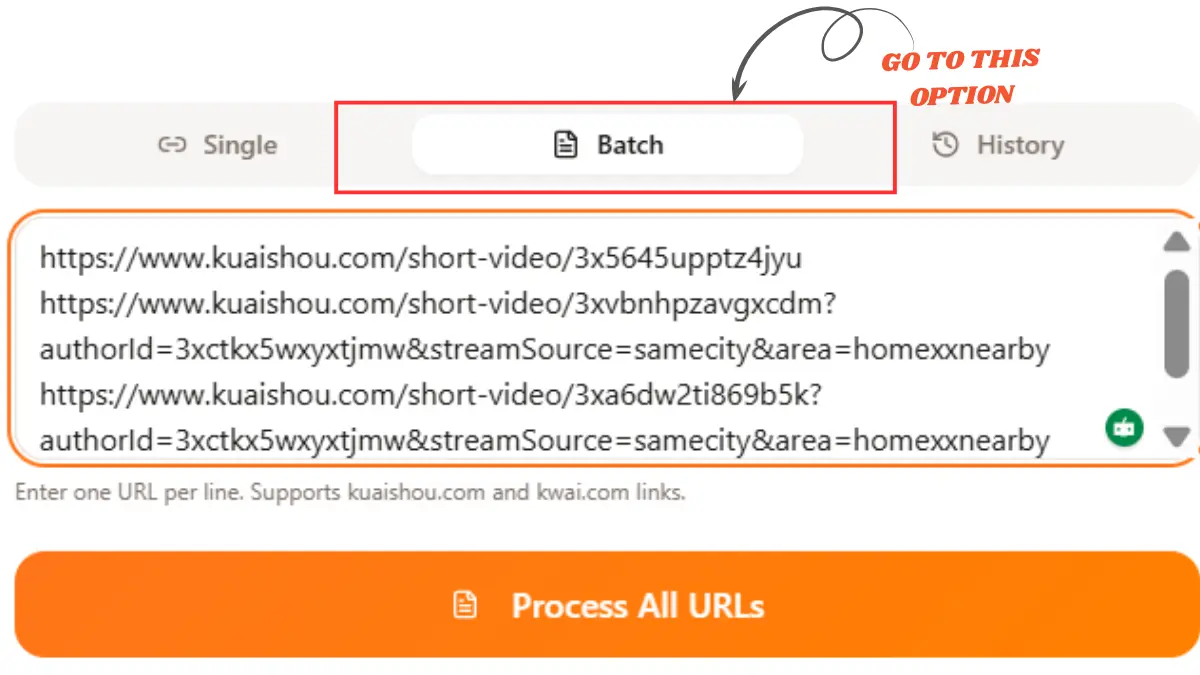
Step 2 — Open the batch downloader tool
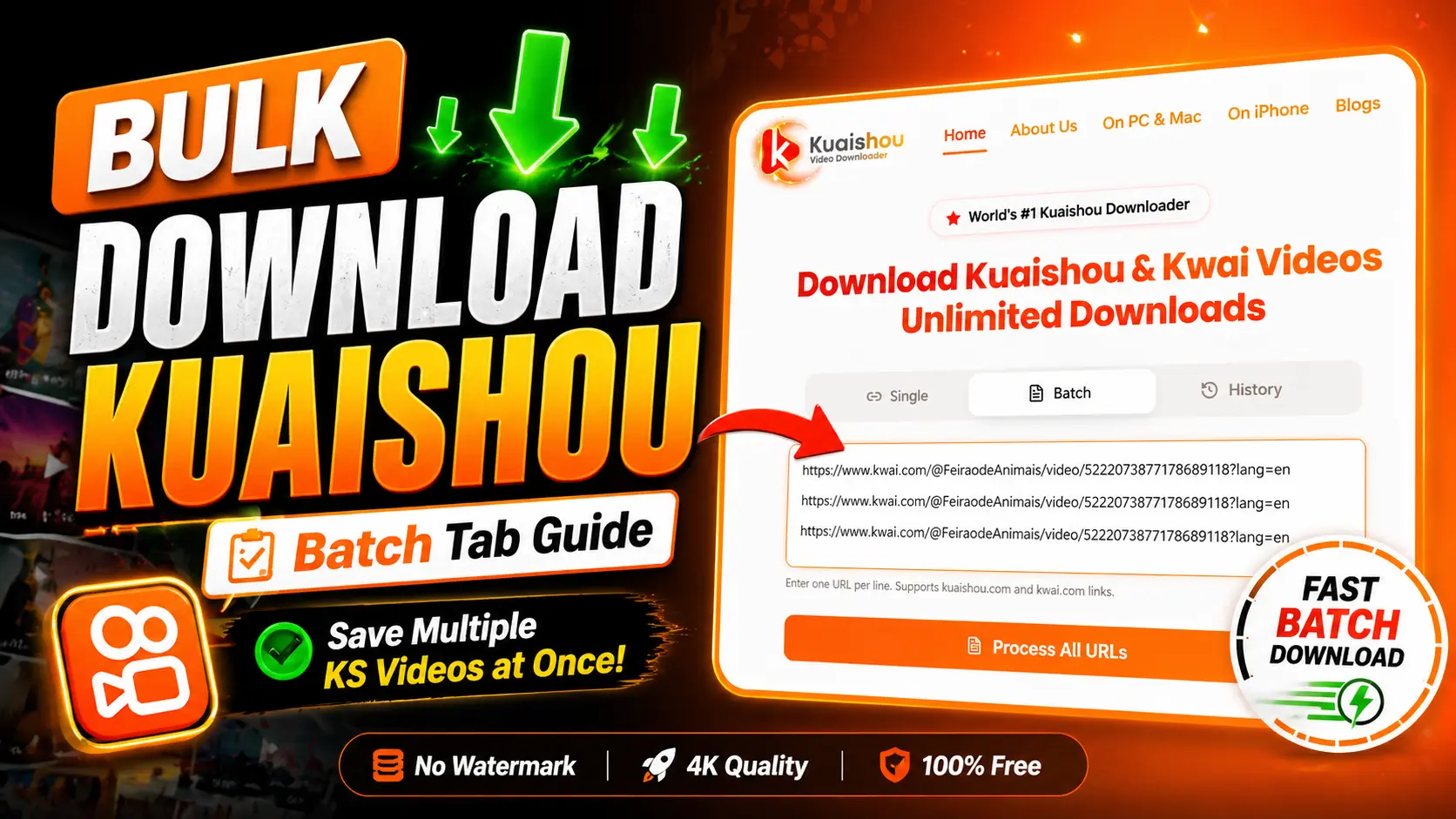
Go to our Kuaishou Video Downloader tool page. Look for the bulk or batch input area — this is a text box that accepts multiple URLs at once, one per line.
The tool works in any desktop or mobile browser with no installation needed. If you are on a Windows or Mac computer and want to know the best browser settings for downloading, our PC & Mac Kuaishou download guide covers that in detail.
Do not use the single-video input field for this. The bulk input processes all links together.
Step 3 — Paste all links and run
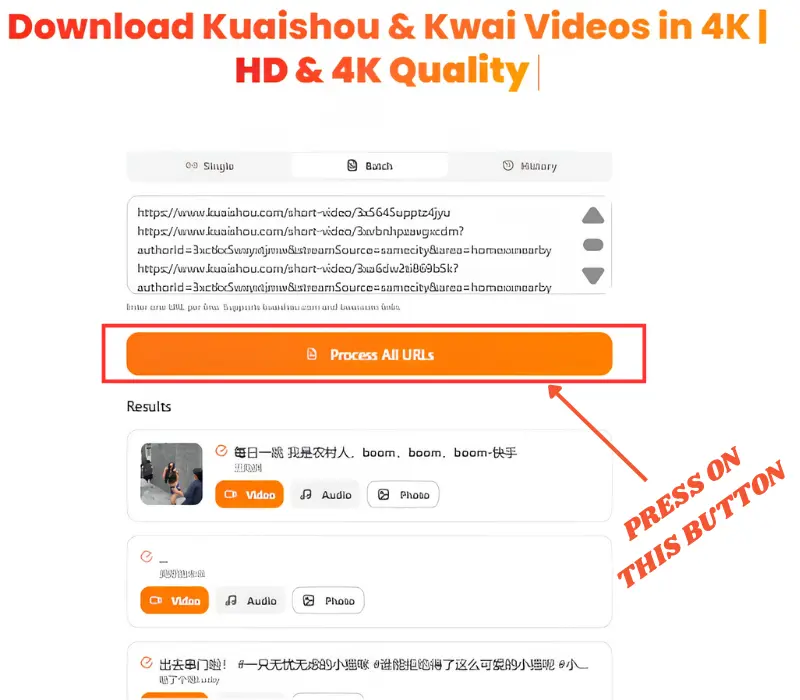
Paste your collected Kuaishou video URLs into the bulk input box, one link per line. Then:
- Click Fetch or Analyze (the button label depends on the tool version)
- Wait for the tool to extract video details — title, resolution options, and file size
- Select your preferred quality (1080p or 4K where the source supports it)
- Click Process All URLs
All files begin downloading to your device simultaneously or in a fast queue, depending on your browser settings.
Kuaishou Bulk Download Features
Not every tool handles batch downloads in the same way. Before you use ours or another batch downloader tool, check for these:
- Multiple URL input — can you paste 10, 20, or 50 links at once?
- No watermark output — the downloaded file should have no Kuaishou/Kwai logo burned in videos
- Quality selection — you should be able to choose between SD, HD, and 4K
- MP3 extraction — it’s a useful audio extract option if you only need the audio from a video
- No account required — make sure it doesn’t ask for any email or phone number for using batch download.
- Mobile browser support — the tool should work on Android and iOS browsers, not just desktop
Download for Kuaishou Video Maker Edit APK – What You Need to Know
Many Android users search for Download for Kuaishou Video Maker Edit APK when they want to create or edit short videos directly on their phone. The Kuaishou app itself (available on the Google Play Store) includes a built-in video editor for trimming, adding music, applying filters, and publishing.
However, the native app does not include a built-in bulk downloader. If your goal is to save multiple videos to your device, the app does not give this option itself.
Download Kuaishou APK to edit videos on Android, or use a web-based batch downloader tool—What Works Better
If you are an Android user, you want to know how to download the Kuaishou APK for video editing on Android and also need batch downloading:
| Task | Best Option |
|---|---|
| Creating and editing short videos | Kuaishou app (Play Store) |
| Downloading a single video | When you download a single video, go to our website and choose the single video download option. |
| Bulk downloading multiple videos | If you have multiple videos and you want to download them once, then choose batch downloader options in our tool (no install needed) |
| Editing downloaded clips | Any Android video editor app (CapCut, VN, InShot) |
A web-based batch downloader works in your Android browser without any installation, which is often faster and safer than third-party APK files from unknown sources.
Common Questions About Kuaishou Batch Downloading
One More Thing Before You Start
The cleaner your link list, the faster your batch runs. Remove any duplicate links before pasting and make sure each URL is a direct video link (not a short redirect or app share link that requires the app to open).
Guide last updated: 2025. All steps reflect the current tool interface.